Collision, holes and walkable tops
A rendered silhouette and a placement footprint answer different questions. A tree canopy covers a large image area, but only its trunk should block walking. A doorway lintel appears above the player; its jambs block the ground.
In 2D Iso, enable Follow recipe shape in the placement sidebar to use an MZ recipe's footprint. When a recipe has no footprint, Eldiron uses its rendered mesh bounds. This setting applies to selected independent placements and to subsequent placements.
Start with the built-in examples
| Recipe | Footprint | What to test |
|---|---|---|
| Wall corner | One concave L | Walk into the empty part of the corner |
| Tree | Trunk contour | Walk under the canopy without walking through the trunk |
| Doorway | Two disconnected jambs | Walk through the opening beneath the lintel |
| Repeated posts | One region per post | Walk between posts |
| Ring walkway | Outer contour with a hole | Step onto the ring, into its empty center and back onto the ring |
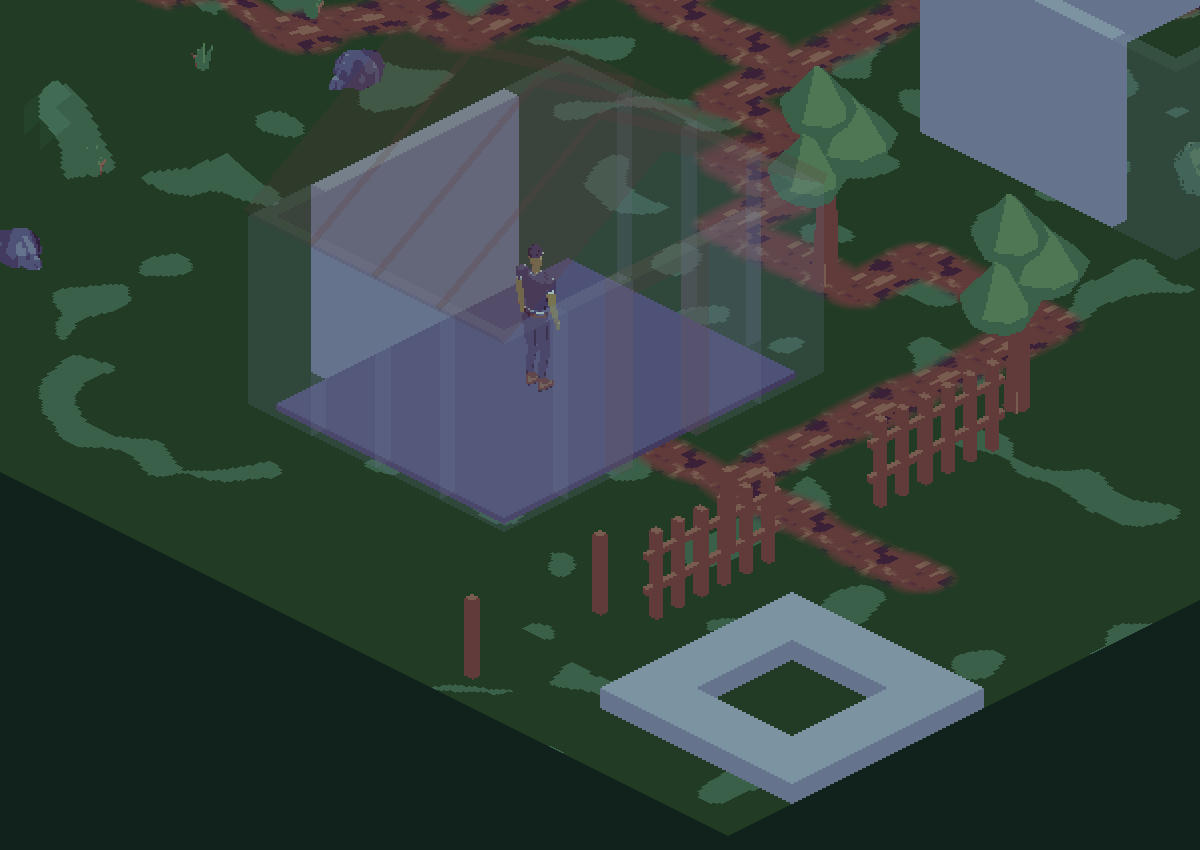
Collision comes from the ground-contact shapes, not the sprite's bounding rectangle.
Author one contour
- Inside the mesh Group, add a Contour row above the output mesh row.
- Draw a simple closed polygon with 3–64 vertices. For a footprint, the two contour coordinates mean X/Z.
- Add Footprint after the final mesh construction and select that contour.
- Bind the contour coordinates to published dimensions when those dimensions can change.
- Place the mesh with Follow recipe shape enabled and test movement around it.
Footprints are invisible recipe data. They add no triangles to the rendered asset. A concave outline is supported, but a self-intersecting contour is invalid.
Add a hole
Create an outer contour and one or more inner Contour rows. In the Footprint operation, use Add hole to choose each inner contour. Each hole must lie strictly inside its outer contour. Holes in the same region cannot touch, cross, overlap or contain one another.
The Ring walkway recipe is the worked example. Its outer rectangle supports the player; its inner rectangle removes support in the middle. The ring's top is at local Y=0 and its thickness extends below that plane. Place it at Top height 0.25 with Walkable top enabled to test a small raised surface.
A hole in a footprint does not cut a visible opening into a solid Box. Construct the mesh geometry to match the intended opening as well.
Add disconnected regions
Append another Footprint operation and enable Add region. Its outer contour becomes another region of the same placement. Each region can have its own holes.
For a doorway, assign the left and right jamb footprints to the geometry before assembling it with the lintel. Leave the lintel without a ground footprint. Assemble carries the two jamb regions into the final mesh. For posts, attach a footprint to the seed post before Repeat so each copy receives the same contact shape.
Regions are combined as a union. A hole removes area from its own region; another region can create an island inside that hole. Overlapping outer regions are allowed.
Collision and walkable support
A tile's blocking setting determines whether its footprint obstructs walking. Walkable top creates support at the placement's Top height. For a top-anchored part such as Ring walkway, this is the visible top plane. For other recipes, check the recipe's local origin before assuming Top height describes the visible top of the mesh.
Do not mark ordinary walls or trees as walkable tops. Use a nonblocking tile with a walkable top for a surface the player should stand on. Movement and grid navigation use the precise footprint, preserving narrow gaps and holes.
Terrain height and mesh support are separate. The Terrain tool produces a continuous landscape. Stacking flat solids produces steps; a footprint does not turn those steps into a smooth hill.
Editing and freezing
Recipe changes can alter point counts, region counts, holes and dimensions. Follow mode updates collision/support while retaining the placement anchor and sector identity. Directional art and footprints use the same baked view.
Turn Follow recipe shape off to freeze a placement's current contour for manual map editing. It retains its precise collision behavior. Shared map edges and vertices are protected: automatic updates do not rewire neighboring hand-authored geometry.
Footprints are retained through save/reopen, undo, rotation, dragging and copy/paste. Invalid recipe edits retain the last valid rendered result and collision cache; correct the recipe error before judging the new shape.
Limits
Static recipes support up to 128 regions, 256 rings and 4096 total footprint points, with 3–64 points per ring. One Footprint operation accepts up to 32 holes. Animated placement footprints are not supported.
Whole-model transforms and published whole-group transforms carry the shape. For individual-part deformation, bind the footprint's coordinates explicitly. See controls and troubleshooting.