Introduction
Eldiron Creator is where everything comes together—a graphical editor that lets you build your own adventures.
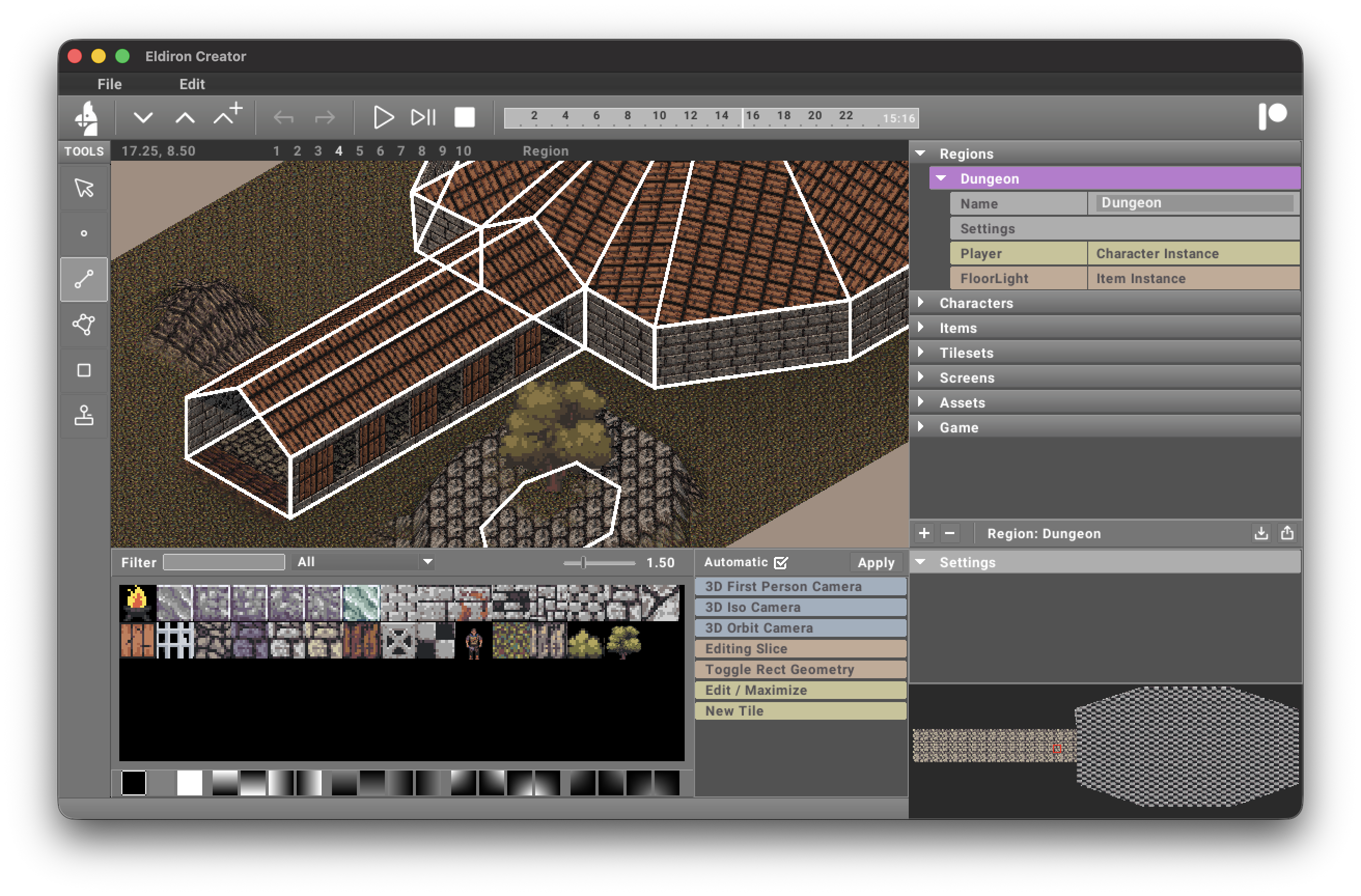
On the left side of the screen, you’ll find a list of tools. These tools are used to edit the geometry of the currently selected region or content. The 2D and 3D geometry is displayed in the geometry editor in the middle of the screen.
The geometry editor can be used in 2D, orbit, isometric, and first-person camera modes. In FirstP mode, WASD moves whenever the viewport is focused. Hold the right mouse button to look with a physical mouse, or press Space to toggle touchpad look; FirstP intentionally has no pan operation. See First-Person Camera for the full control summary.
In Orbit mode, the camera-synchronized ViewCube can align the view to an axis. Press B before dragging to perform a one-shot Box Select in the active geometry selection mode; outside Orbit, B remains the Prefab Tool shortcut.
The right sidebar has compact tabs for the main working contexts:
- Project contains the project tree, which lists editable content such as regions, characters, tilesets, and more.
- Actions contains the actions currently available for the selected geometry, project item, tool, and camera. Actions are grouped with labels such as Camera:, Face:, and Bake: and use a theme-defined color for each group. Selecting an action also displays its parameters in this sidebar.
- Console provides concise live-game inspection plus action, tool, and editor automation commands. See Console.
- Debug displays live runtime diagnostics, warnings, errors, and server startup messages without mixing them into the Console command history. During play, the Nodes dock visualizes executed nodes, connections, and event values. See Debug.
- Help provides a wrapped, read-only response area above a question field. This page is reserved for the upcoming ruleset-aware interactive help system.
The minimap remains visible below the active sidebar page and automatically adjusts to the current context, such as regions or tiles. Use Tab to move to the next sidebar page and Shift+Tab to move to the previous one. These shortcuts also work from the Console, Debug, and Help fields so you can leave any of those pages without reaching for the mouse.
Use the direct sidebar shortcuts when you do not want to cycle:
Ctrl/Cmd+Shift+F: ProjectCtrl/Cmd+Shift+G: ActionsCtrl/Cmd+Shift+H: ConsoleCtrl/Cmd+Shift+J: DebugCtrl/Cmd+Shift+K: Help
Frequently used camera actions are also available as right-aligned icon shortcuts beside the project tabs, so changing the editor camera does not require opening the Actions page.
After the camera shortcuts, a separator marks two dock controls. The frame-corners button opens or maximizes the editor for the current dock (Cmd/Ctrl + [), while the down-caret button restores the normal editor/dock split (Cmd/Ctrl + ]). These are direct controls and do not appear in the Actions page.
At the bottom of the screen you see the currently active dock, in this screenshot the tile picker. The tile picker is now both a source browser and an entry point into Eldiron’s tile authoring workflows:
- single tiles can be edited in the integrated pixel editor
- node groups can be edited in the tile node graph editor
The lower dock is reserved for the active content editor or picker. See Dock Controls for opening and restoring dock editors, and Actions for details about the contextual action list in the right sidebar.
Creator can also be controlled by local automation through Scepter: Remote Editing. Scepter is the command layer used by AI assistants, scripts, and future tools to inspect projects, preview maps, paint regions, and edit character or item data while Creator keeps ownership of undo, validation, and project state.