Eldiron v0.95.0 Released

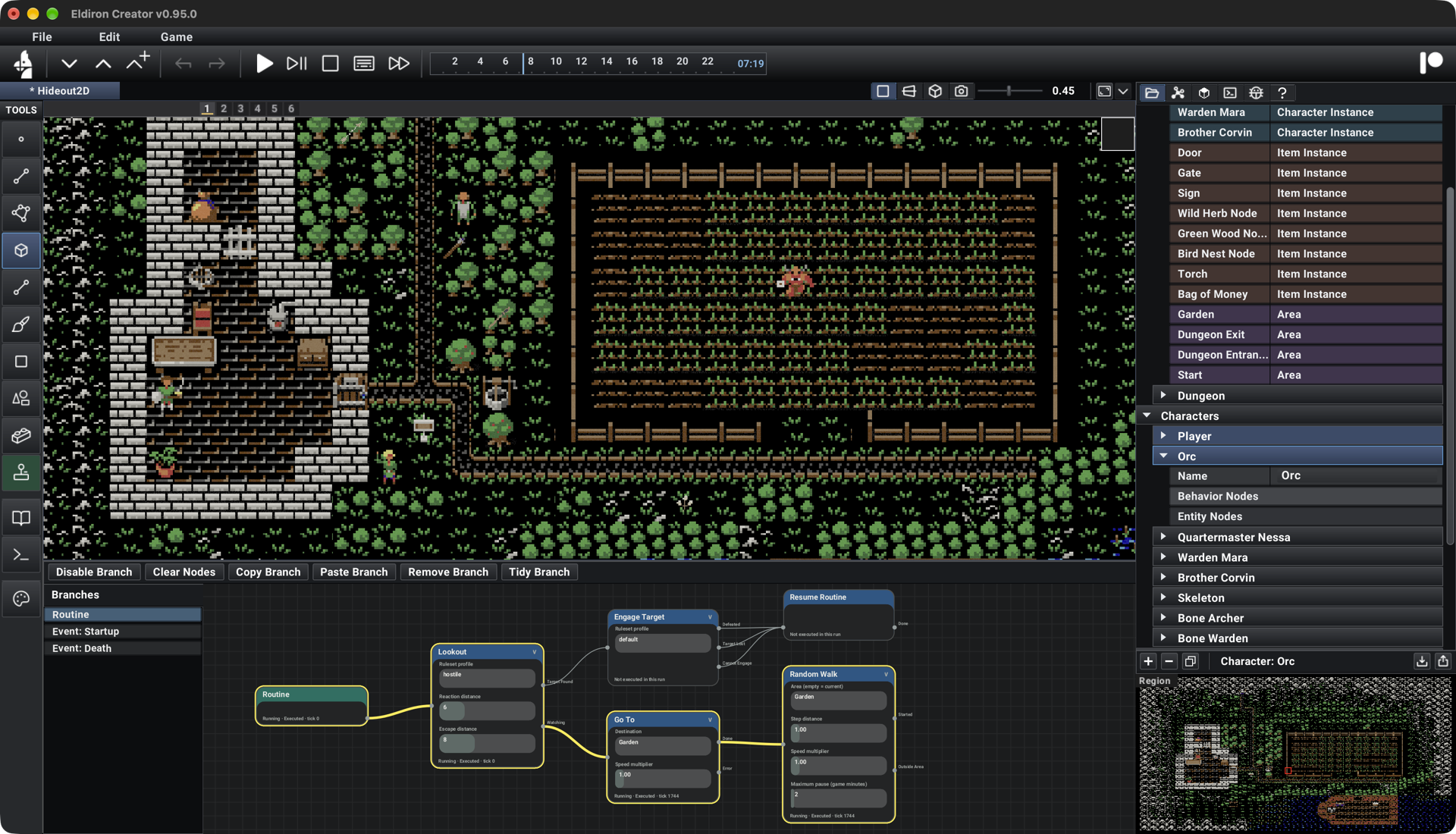
Eldiron v0.95.0 brings Nodes to gameplay, entity configuration, and procedural construction. Events, movement, combat, conversations, and quests can now be authored visually, with parameters on the nodes and live feedback showing what your game is doing.
The screenshot above shows an Orc's routine in Hideout 2D. It watches for targets, engages them when needed, and otherwise walks around the Garden. Highlighted nodes and connections show the active path while the game runs.
Behavior You Can See
Behavior Nodes organize gameplay into event-driven branches for characters, items, areas, regions, and the world. Choose an event, connect the actions from left to right, and adjust their parameters directly in the graph.
Routine describes normal activity. Time Range can select work or sleep hours, while Random Walk and Go To handle movement. Action outputs connect the next step directly, and Resume Routine returns a character to its regular activity after an interruption.
Combat uses ruleset-driven Lookout and Engage nodes. Lookout selects targets using a ruleset profile and adjustable detection distances; Engage moves into the required range and fights using the rules. Target selection and highlighting are shared with normal gameplay.
Branches can be disabled for testing without deleting them. A contextual, color-coded Node List supports drag-and-drop, and graph editing uses the global Undo/Redo system. Shift-drag cuts connections.
Conversations, Quests, And Parties
The Prompt node presents a spoken line and its answers. Each answer has its own output, making a conversation readable as a chain of connected choices. Optional guards control which answers are available.
Quest State, Set Quest, and Quest Guard connect quest progress to conversations and actions. Inventory and loot nodes add or drop items and check what a character carries. Party nodes support recruiting companions and responding to party events.
Events expose named values that later nodes can reference in text. Node status feedback and execution highlighting make it easier to understand which event fired and which branch followed it. Graph edits take effect during play, so you can refine behavior without restarting the game.
Entity Configuration In Nodes
Entity Nodes configure race, class, attributes, tiles, inventory, lights, and input mappings. Ruleset defaults provide the base values, and connected nodes describe the changes a particular character or item needs.
Templates and placed instances have independent graphs. Template startup runs first, followed by instance startup, so shared behavior and local setup stay easy to distinguish.
Set Tile uses a visual tile picker and is available in both configuration and behavior graphs. Tile-tag events can trigger changes during play, such as changing a character's tile when entering a chair tile.
Shared Construction Patterns
The Wall Tool handles creation and selection, while Construction Nodes describe wall and surface settings. Shared branches can be assigned to multiple walls or surfaces, and Pattern Reference nodes reuse pattern branches.
Pattern graphs combine geometry and material operations, including subdivision, inset, colors, tiles, Value/Voronoi Noise, and Gradient mapping. This gives walls, floors, and ceilings an editable foundation for more varied construction patterns.
Floors and ceilings are independent surfaces. You can create them inside enclosed wall areas, including bulk creation across a layout, and hide ceilings in the editor while leaving them visible in the game.
Updated Starters And Gameplay
Hideout 2D, 3D Starter, Gate, Cellar, and Stonefall Dungeon use nodes. Cellar joins the starter list with editable prefabs, lighting, and particle effects. Stonefall's dungeon walls use native Wall Tool geometry.
The new firstp_mouse camera supports automatic mouse look over the viewport, including looking up and down. First-person views hide the player's own avatar while preserving its lights.
For testing inside Creator, Skip Character Setup starts with Entity Node defaults. Text Play supports numbered conversation answers and uses Entity Node input mappings, while Authoring continues to provide descriptive metadata.
This release also fixes game input routing after restarting play, editor combat overlays, blocked grid movement, and inconsistent particle timing between editor and client views.
Read more about Behavior Nodes, Entity Nodes, and working with geometry.
Take care,
Markus