Eldiron v0.92.0 Released

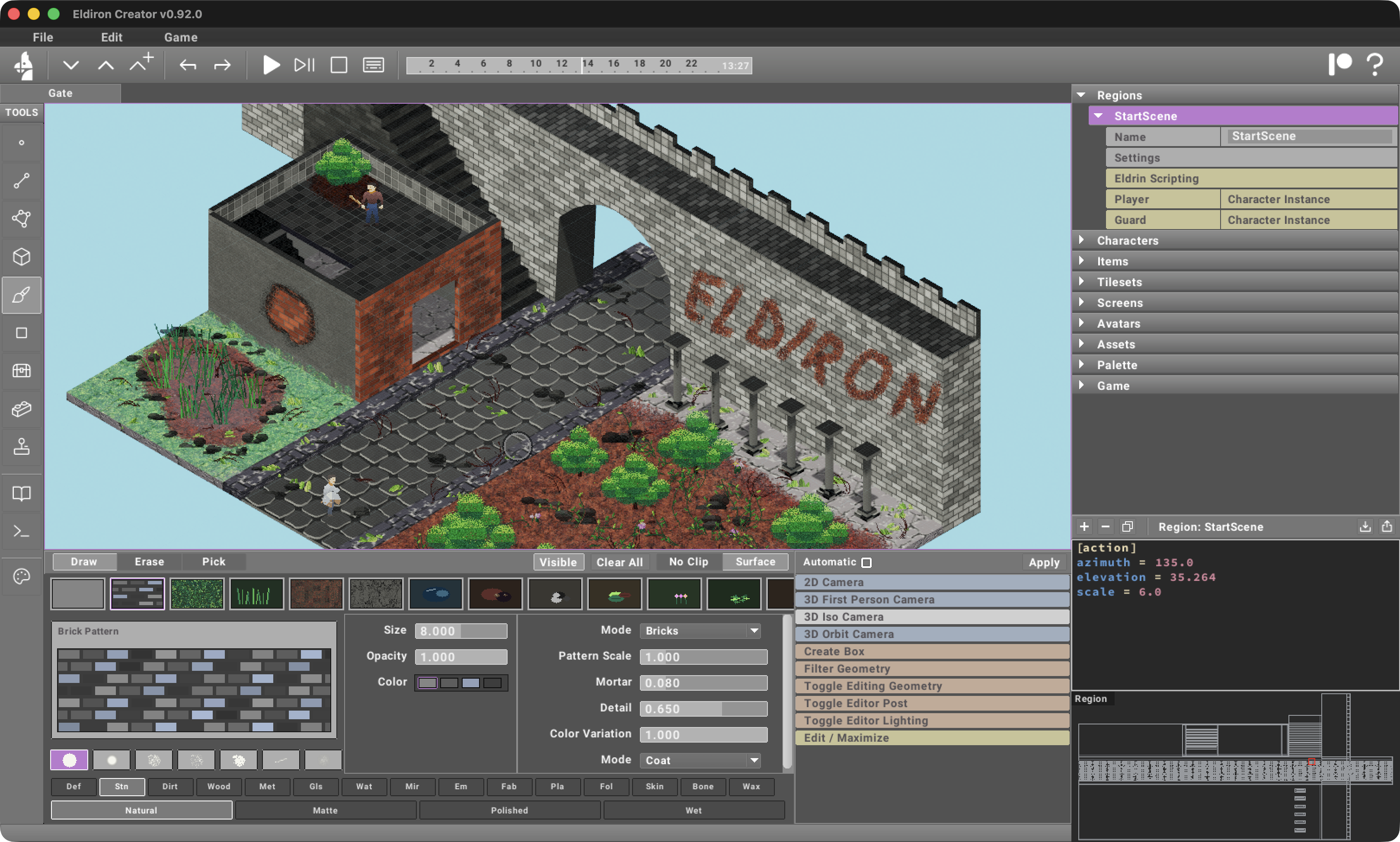
My favorite game of all time is Ultima Online. I have always loved the organic look of its isometric world: worn paths, irregular ground, vegetation growing into the edges, and buildings that feel like they belong to their surroundings rather than sitting on top of a perfect grid.
Simply building geometry in 3D and assigning tiles or materials to it does not create that kind of organic look by itself. Repetition quickly becomes visible, especially across large walls and floors. Creating enough isometric tiles by hand to hide that repetition is also very difficult and time-consuming.
That is why I focused this release on the new 3D Paint Tool. I wanted a way to create the rich, imperfect RPG environments we all love while still keeping the speed and freedom of direct 3D editing. A clean wall can become worn brick, a floor can collect dirt and cracks, and an empty courtyard can grow grass, roots, bushes, puddles, and rubble without leaving Eldiron or preparing a unique texture for every variation.
Eldiron v0.92.0 also adds the new Block Tool for quickly constructing editable rooms, corridors, buildings, and dungeons. The Block Tool creates the structure, while 3D Painting gives that structure history and character.
3D Painting
The new 3D Paint Tool paints directly onto the visible surfaces of 3D Geometry Objects. Paint is stored as a persistent layer in stable local surface coordinates, so it stays attached to the geometry when the camera changes between isometric, orbit, and first-person views.
This is different from assigning a tiled material to a face. A material provides the base surface; 3D Painting adds local detail on top. You can break up repeated walls, make paths look traveled, add damp areas, cover corners in moss, or use color to adjust one part of a surface without changing the underlying material everywhere else.
The paint layer is also non-destructive. It can be hidden independently, cleared, erased with the brush, or edited further without changing the Geometry Objects below it.
Brushes, Patterns, And Materials
3D Painting includes a growing library of brushes for different kinds of detail:
- material and color painting
- brick, tile, and arch patterns
- dirt, moss, cracks, grass, and rubble
- leaves, flowers, vines, roots, bushes, and trees
- candles, footprints, mud, puddles, and wet surfaces
Each preset has its own useful controls. Size and opacity handle the overall stroke, while brushes can also expose palettes, material families, surface finishes, pattern scale, mortar width, detail, and variation. Shape masks range from smooth and soft strokes to speckled, jagged, scratchy, and washed forms.
Generated patterns are especially useful on larger architectural surfaces. Brick and tile brushes produce consistent structures while still allowing controlled color variation, so a long wall does not have to look like one perfectly repeated texture. Arch patterns make it possible to paint openings and accents that follow the same material language.
Material painting can use natural, matte, polished, or wet finishes and can work in several modes. Coat layers a material over the current surface, Replace changes it more directly, and Stamp places a discrete piece of detail.
Surface Stamps
Some details are better represented as objects attached to a surface rather than as flat color. The stamp brushes generate things such as grass, flowers, rubble, roots, bushes, trees, candles, and footprints at the painted location.
These stamps keep a stable surface anchor, size, rotation, palette, material, opacity, and variation. They remain attached to their owning surface and keep their world-space size as the camera moves. This makes them useful in all 3D perspectives: grass painted in isometric view is still the same grass when the game switches to first person.
Stamps also participate in normal 3D occlusion. A plant behind a wall remains behind the wall, instead of behaving like a screen-space decal. Erasing can remove the intended painted detail without requiring you to find and edit a separate Geometry Object.
The Block Tool
The new Block Tool is the fast construction side of this release. It builds 3D regions from modular block stamps and is designed for houses, dungeon rooms, corridors, walls, stairs, columns, and early blockouts.
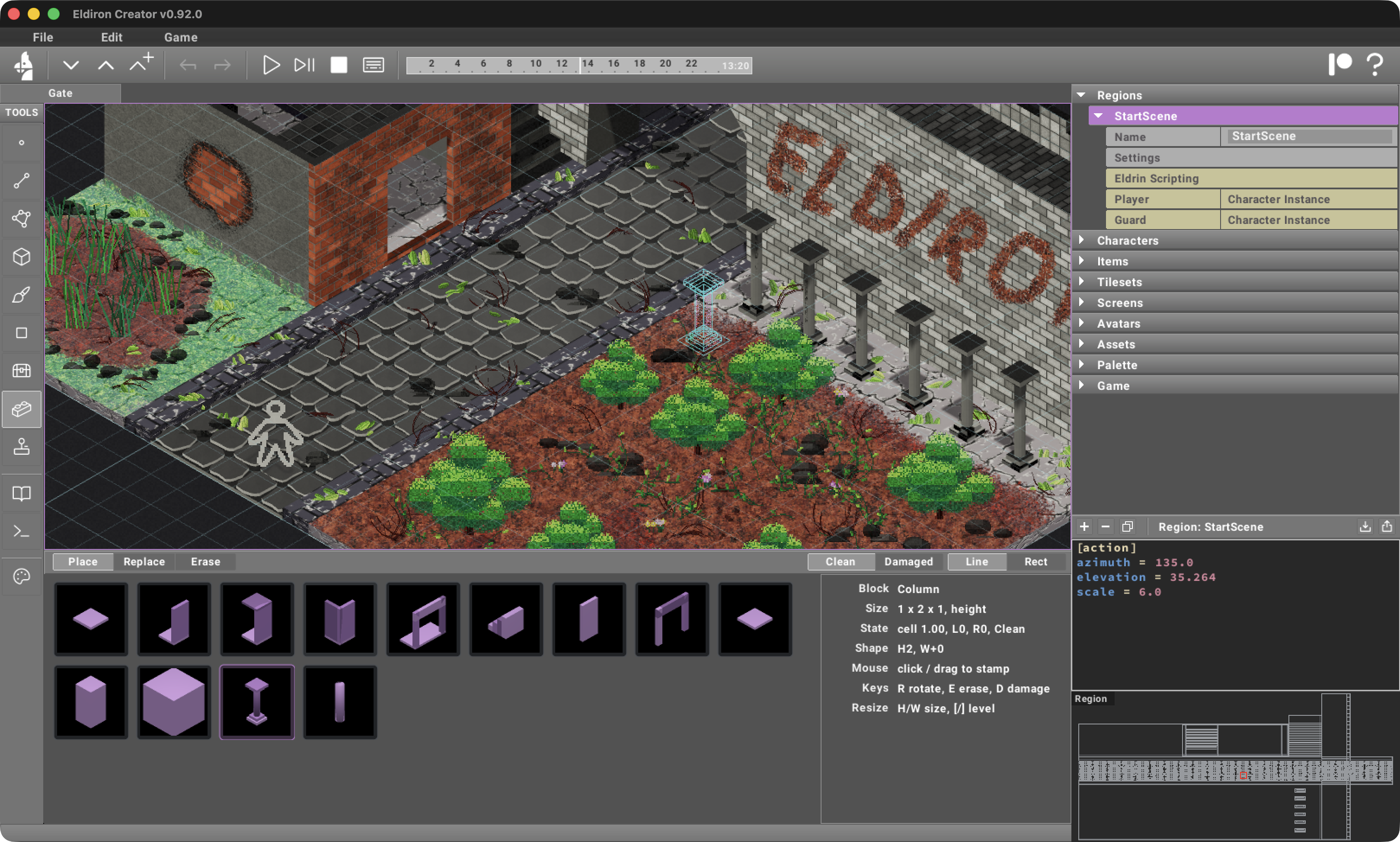
The initial block library includes floor slabs, walls, doorways, ceilings, stairs, solid blocks, columns, and useful combinations such as Floor + Wall, Floor + Corner, and Floor + Doorway. Composite stamps place several coordinated pieces in one action, which makes it much faster to outline a room or run a corridor.
You can click to place a single block, drag a straight line, or fill a rectangular area. Blocks rotate in 90-degree steps and can be placed on different stack levels. Height-aware and width-aware parts respond intelligently when resized: a taller wall does not make its floor slab thicker, and a wider doorway grows the opening rather than its side posts.
The Block Tool supports three editing operations:
- Place adds the selected block.
- Replace swaps complete block instances on the affected cells.
- Erase removes complete block instances, including multi-part stamps.
There are also Clean and Damaged variants. Damaged blocks receive deterministic chips and wear when they are stamped. The result is stored with the block, so undo, redo, saving, loading, copying, and pasting do not generate a different shape each time.
Most importantly, placed blocks become ordinary editable 3D Geometry Objects. The Block Tool is not a separate procedural world format and does not require a Builder Graph. Once the basic structure is in place, the existing Object, Face, Edge, and Vertex tools can refine it freely.
From Blockout To Finished Space
The two tools are meant to work together.
Start with the Block Tool to establish the grid, floors, walls, doors, stairs, and columns. Rotate and stack blocks to find the shape of the space, replace sections as the layout changes, and use damaged variants where the architecture should already feel broken.
Then switch to 3D Painting to remove the uniformity of the blockout. Paint brick arrangements onto important walls, add dirt where people walk, place cracks and rubble around damage, let vegetation grow into neglected corners, and add wet material around puddles. Because both tools work directly in the region, the scene can develop in context from every camera perspective.
The screenshot above was built with this workflow. The architecture gives the scene a clear playable structure, while the painted layers and stamps make each area feel different without requiring a unique hand-authored texture set for every wall and floor.
v0.92.0 is another step toward making Eldiron's 3D editing feel like a complete world-building environment: quick enough for experimentation, but with enough direct control to turn a blockout into a place with its own visual story.
Take care,
Markus