Eldiron v0.94.0 Released

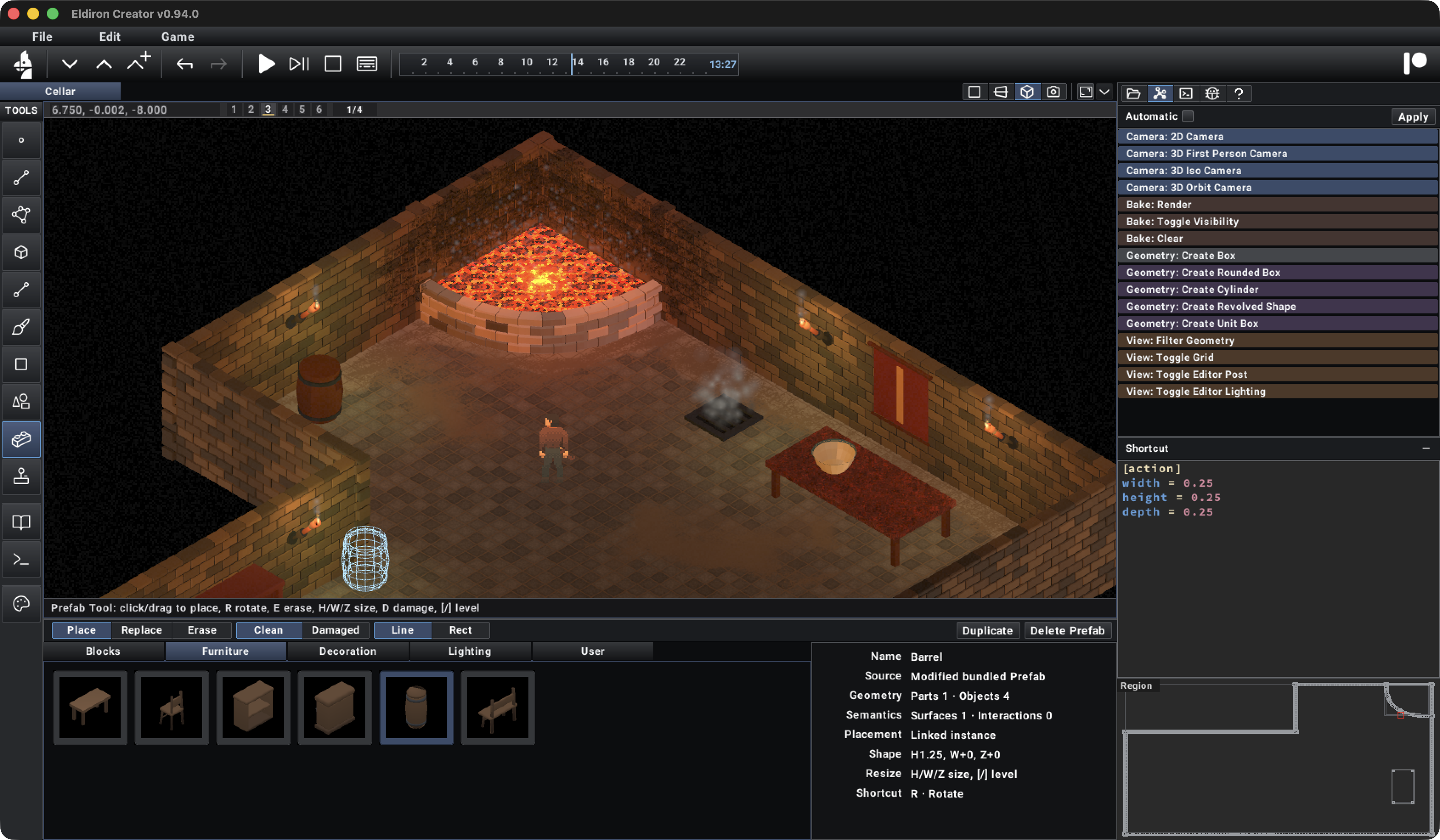
Eldiron v0.94.0 is a big step forward for building 3D worlds directly in Creator. A connected Wall Tool, a complete Prefab workflow, new modeling tools, and more flexible 3D Paint make it possible to build the structure of a scene, furnish it, and add surface detail within the same editor.
The screenshot above shows these tools coming together in a cellar scene: curved masonry, furniture, glowing surfaces, and smoke, with the new Prefab browser ready for placement. Alongside the world-building tools, this release brings a refreshed Creator interface, responsive game screens, and a configurable action bar.
Connected Walls And Floors
The new Wall Tool builds connected masonry from an editable graph. Walls can have straight or curved spans, openings, block surrounds, varied materials, and damage. Nodes remain editable, and Shift multi-selection makes it easier to adjust several parts of a layout together.
A one-shot Ring gesture creates closed round masonry for wells, towers, and similar structures. Automatic floors provide walkable surfaces for open or closed authored areas, including concave layouts, and can also be added later through the Floor toggle.
Wall Surface mode creates fitted solids inside a selected bounded wall region. Their height can be adjusted in 0.25 steps without altering wall-mounted Prefabs. Create Fitted Geometry also works directly from rectangular or arched Wall openings, producing custom-depth solid or barred inserts with single or split leaves.
A Complete Prefab Workflow
Prefabs bring reusable, editable objects into the scene-building workflow. Creator now includes categorized browsing for bundled furniture, decorations, and lighting, along with a dedicated editor for geometry, 3D Paint, materials, particles, lights, and hierarchical parts and components.
You can customize a bundled Prefab, name or duplicate it, and place linked instances throughout a region. Those instances share authored content while retaining independent materials and runtime state. They move as complete units and support grid-aware placement, resizing, rotation, flipping, detaching, and reattaching.
Prefabs also carry useful behavior. Wall-mounted objects fit smoothly onto walls, and doors support contextual single or split Swing and Slide interactions. Authored support surfaces provide snapping, capacity, and item rules, so items and decorations can keep their placement relative to the surface that holds them.
This makes a table, shelf, or door more than a collection of geometry: its parts, appearance, and interaction settings can be authored together and reused.
More Flexible 3D Modeling
Several new tools expand what can be modeled inside Creator:
- Revolve turns an editable profile into mesh geometry, with presets, snapping, and whole-profile scaling.
- Rounded Box and Cylinder primitives remain adjustable before conversion to ordinary geometry.
- Create Unit Box places a fixed 1 × 1 × 1 primitive centered on the selected surface.
- Edge Bevel adds adjustable width, segments, and roundness to selected mesh edges.
- C: Select Contour expands a rim-edge selection into its closed coplanar boundary, including irregular and arched openings.
A persistent XZ construction grid with major lines and colored axes is available in every 3D editor camera. The region and Prefab editors also share a camera-synchronized Orbit ViewCube: click a visible face to align the camera to that axis.
Navigation is clearer too. Orbit mode has an explicit B: Box Select shortcut, while a focused First Person viewport always supports WASD movement. Right mouse and Space control looking.
Painting, Emission, And Smoke
Procedural Wall masonry now behaves as a continuous 3D Paint target. A brush stroke covers bricks, mortar, bevels, spans, and bonded corners with one screen-sized footprint, making it easier to paint detail across a whole wall.
Surface-projected rectangular selections add another way to control painting. Selections snap to the grid, can be moved along the surface, and provide an outline preview with constrained drawing and erasing, brush-aware fill, clear, and undo. Existing version-23 paint bakes remain compatible, and temporary render copies no longer rebuild them while loading or navigating painted projects.
Selected faces can now emit real-time light through persistent Face Emission, including faces on regenerated Wall surfaces. Smoke particles can also be authored across selected geometry, with optional palette-linked color ramps. Particle diagnostics and a per-layer billboard budget help keep larger effects manageable.
Surface detail is now centered on 3D Paint. The older Surface Noise and Create Pattern actions have been removed, along with Cut Profile as modeling moves toward more general geometry operations. Clear Surface Detail removes surface-line guides while preserving paint, materials, and generated geometry.
A Refreshed Creator
Creator now defaults to a new black-and-blue theme, with theme-driven widget rendering, action-group colors, compact navigation, delayed localized hover help, and clearer contextual shortcut guidance.
The sidebar is organized into Project, Actions, Console, Debug, and Help. Runtime diagnostics have their own Debug page, Tab and Shift+Tab cycle through the pages, and direct shortcuts are available from the Game > Show menu. Creator also starts with the Object tool selected.
The interface changes extend to smaller interactions: popup selection follows the pointer correctly when a menu is shifted to fit the window, hover help sizes and wraps more reliably, and Escape closes an open full-screen editor.
Responsive Game Screens And Action Bars
Game screens gain per-screen Settings TOML and responsive layouts. Responsive screens follow the client window as it resizes, game widgets fill the available area, and UI widgets can anchor to the edges or center. Fixed layouts and UI-only screens remain supported.
The new configurable action_bar widget provides grouped ruleset commands, ten-slot quick bars, responsive placement, separators, gradients, and scalable artwork. Toolbar-configured Inventory, Equipment, Spellbook, Actions, and Preferences panels bring together ruleset-owned gear slots, a live equipped avatar, fitted tabs, scrolling details, tooltips, reusable choices, and drag-and-drop.
Generated controls use embedded Roboto, with independently replaceable ruleset and navigation icons. Spellbook and Actions panels also show an explicit empty state when the active character has no matching entries.
Editable Item Artwork And Project Storage
Official item icons are now artist-editable RGBA artwork with separate Off and On rows and independent animation frames. The torch uses the same icon bundle for UI artwork and its state-dependent world tiles. Project-painted icons update the live runtime immediately, including game UI, 2D previews, and 3D billboards, while animated icons retain their complete frame sequence.
Load Default restores the underlying artwork instead of resolving back to an already-edited project icon. Action icons preserve their normal artwork, gray out when disabled, and highlight selected states without outlines.
Underneath this, .eldiron projects now use compressed, versioned ZIP containers. Project data, background bakes, and customized item icons share a validated storage path, and Creator saves atomically. Older raw-JSON projects and earlier bake layouts remain readable and are upgraded on their next save.
Fixes And Refinements
Other fixes in v0.94.0 include:
- keeping Screen editor grids and widget bounds visible when overlays change or the canvas is composited over black;
- preserving
gameplay_tagswhen applying tile metadata; - fitting Pixel Editor images to the available canvas from the start;
- avoiding unnecessary scene rebuilds when expanding an edge-loop selection;
- preserving seamless planar materials across triangulated fitted geometry;
- improving wrapped Debug output colors and removing redundant severity labels.
With v0.94.0, more of the scene can be built and refined directly in Creator, from connected masonry and reusable furniture to painted detail, light, and smoke. I'm looking forward to using these tools to build out Eldiron's worlds further.
Take care,
Markus